A screenshot of a payment is not a payment. It is a picture of a screen, and pictures are easy to change. Sellers on Facebook Marketplace, freelancers, landlords taking deposits and small shops lose goods and money every day to a convincing image of a transfer that never happened.
The good news is that the fix for individuals does not depend on spotting the fake at all. The harder problem belongs to businesses whose workflows accept screenshots as evidence, and that is where forensics earns its place.
Key takeaways
- Check the account, not the image. The only proof a payment arrived is the payment showing as completed in your own app or bank account.
- Scams follow scripts. "I sent too much", "upgrade to a business account to receive it" and "it's pending, just ship it" are all known patterns.
- Visual tells are a bonus, not a test. Wrong fonts and odd status bars catch lazy edits. Careful edits leave none.
- Platforms need forensics. If your process accepts a screenshot as evidence, a person looking at it is the weak point.
How fake payment screenshot scams work
Almost every case follows one of four scripts.
1. The "already paid" buyer. The buyer sends a screenshot showing a completed Cash App, Zelle or Venmo payment and asks you to ship, hand over the item, or start the work. No money ever moved.
2. The overpayment. The screenshot shows more than the agreed price. The buyer apologises for the mistake and asks you to refund the difference. You send real money back from your own balance. The FTC warns that being asked to send back part of a payment is a hallmark of fake check scams. The same script now runs with payment app screenshots.
3. The fake notification. Instead of a screenshot, you get an email or text that looks like it came from the payment app, saying the funds are on hold until you upgrade to a business account, pay a fee, or confirm your details. Real payment apps do not ask you to pay to receive money.
4. The "pending" payment. The screenshot shows a payment as pending or scheduled, and the buyer says it will clear later. Sometimes a real payment is sent from a stolen card or compromised account and later reversed, which is a different scam with the same lesson: wait until the money has actually settled.
For sellers and freelancers: how to check a payment is real
You do not need to examine the screenshot at all. Do this instead:
- Open your own app. Close the message, open Cash App, Venmo or your bank's app yourself (not from a link), and look for the payment in your activity.
- Check the status, not just the line. The payment should show as completed and the funds should be in your balance. Pending is not paid.
- Never refund an "overpayment" until the full original payment is confirmed in your account. If you are overpaid for real, the safest route is to let the sender reverse it through the app's own support process, not to send money back yourself.
- Ignore links in payment emails. Notifications for Zelle come from your bank, not from a separate Zelle account. Cash App and Venmo activity is always visible in the app itself.
- Slow down under pressure. "My driver is outside" and "I need it shipped today" exist to stop you checking.
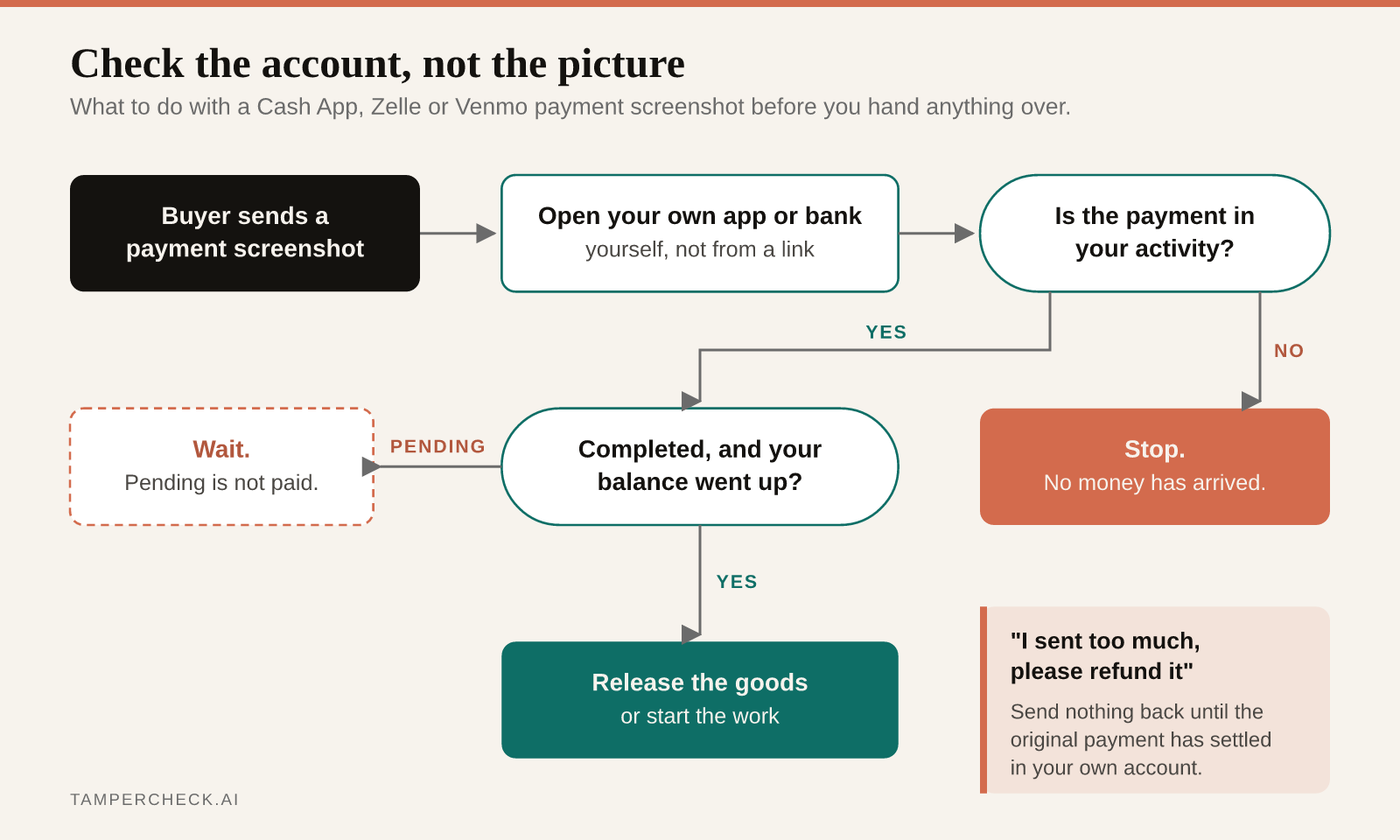
App by app. Cash App: check the Activity tab; a real payment shows as completed and your balance changes. Zelle: check your bank's app or online banking, since Zelle payments land directly in your bank account and Zelle notifications come from your bank. Venmo: check your activity and balance, and treat payments from strangers with caution until they have settled.
Visual tells, and why they are not enough
A quick look at the screenshot can still catch a lazy edit. Common giveaways include:
- an amount in a slightly different font, size or weight from the rest of the screen;
- amounts that sit off-centre or off the baseline;
- a time format or date format the app does not use;
- a status bar (clock, battery, signal) that does not match the phone the buyer claims to have, or a time that contradicts the payment time;
- a recipient name or
$cashtagthat is one character off from yours; - a transaction ID or reference that is missing, or in a format the app has never used;
- an interface from an old version of the app.
These are worth a glance. They are not a safe test, for two reasons. First, payment apps change their design regularly, so a "wrong" layout may simply be a newer version. Second, a careful edit, or a screenshot built from a template, leaves none of these signs. If your process relies on spotting them, it relies on the fraudster being careless.
For platforms that accept screenshots as proof
Many businesses accept payment screenshots as evidence without thinking of it as a fraud surface: marketplaces settling disputes, property managers taking deposits, lenders confirming down payments, gig platforms verifying payouts, schools and clubs collecting fees, and support teams handling "I already paid" tickets.
Where you can, replace the screenshot with a direct confirmation from the payment provider or a bank-data connection. Where you cannot, the screenshot needs the same scrutiny as any other submitted document, and a human looking at it is the weak point.
Screenshot checking is a branch of document fraud detection: it looks at how the image was made, not what it says:
- Error level and compression analysis. An edited region, such as a retyped amount, recompresses differently from the untouched screen around it.
- Noise consistency. A real screenshot has uniform, synthetic-looking pixels. A pasted element or a photo of a screen has different noise characteristics.
- Text rendering per field. App interfaces render text with one engine and one set of fonts. A figure typed over the original has different sharpness, anti-aliasing or spacing.
- Template and duplicate detection. Fraudsters reuse the same base image. The same screenshot appearing across several claims, with only the amount and name changed, is a strong signal.
- File provenance. Screenshot metadata, image dimensions that do not match any real device, or signs that the file passed through an editor. You can inspect an image's metadata yourself with our free EXIF viewer.
With automated document tampering detection, TamperCheck runs these checks on each uploaded screenshot and returns a verdict, the specific findings with the suspect regions marked, and a risk score your workflow can route on. Images are processed with zero retention and never used for training.
Check payment screenshots at upload
See how TamperCheck flags an edited payment screenshot, with the altered region highlighted. Free credits to start, no contract.
Test a payment screenshot →If you are building this into a dispute or onboarding flow, the document verification API returns results by webhook or on request. For the wider set of documents fraudsters edit in the same way, see our guides to spotting AI-generated fake receipts and fake pay stubs.
FAQ
- Can a Cash App screenshot be faked?
Yes, easily. A payment screenshot can be edited or built from a template in minutes. The only reliable proof is the payment showing as completed in your own Cash App activity and balance. Never ship goods or refund money based on a screenshot alone.
- How do I know if a Zelle payment is real?
Log in to your bank's app or online banking directly, not through a link, and check that the payment has arrived in your account. Zelle payments go straight into your bank account, and Zelle notifications come from your bank. An email saying the funds are on hold until you upgrade an account or pay a fee is a scam.
- How can I tell if a Venmo screenshot is fake?
You often cannot tell from the image, which is why it does not matter. Open Venmo yourself and confirm the payment appears in your activity and that your balance has increased. Look out for buyers who "accidentally" overpay and ask for a refund.
- Someone sent me too much money and wants a refund. What should I do?
Do not send money back. First confirm in your own app that the original payment actually arrived and has settled. If it really was an overpayment, ask the sender to resolve it through the payment app's support, rather than sending a refund yourself. Overpayment requests are a well-known scam pattern.
- Is a payment screenshot valid proof of payment?
No. A screenshot can show a payment that never happened or was later reversed. Businesses that must accept screenshots should confirm with the payment provider where possible, and run forensic checks on uploaded images to catch edited or reused ones.
- How do platforms detect fake payment screenshots?
Forensic analysis checks how the image was produced: compression and error-level differences around edited figures, noise inconsistencies from pasted elements, text that renders differently from the app's own interface, metadata that does not match a real device, and reuse of the same base image across claims. These signals hold up even when the edit is invisible to a reviewer.
- Where do I report a payment app scam?
Report it to the payment app or your bank first, then to the FTC at ReportFraud.ftc.gov in the US. Keep the screenshots, messages and usernames, as they help the provider and investigators.