A pay stub is the fastest way to prove income, so it is also one of the most forged documents in US lending, leasing and hiring. Pay stub generator sites sell a polished PDF for a few dollars, and the result looks the same as something ADP or Gusto would produce.
That is the problem. A reviewer who checks whether a stub looks right will pass most fakes. A reviewer who checks whether the stub adds up, whether it obeys payroll rules, and whether the file's history matches its story will catch most of them.
This guide covers ten checks you can run by hand, in roughly the order a good underwriter would, and then explains what automated forensics adds on top.
Key takeaways
- Appearance is no longer evidence. Generator sites copy real payroll layouts closely. A clean-looking stub tells you very little.
- Payroll math is the fastest filter. FICA rates, year-to-date totals and gross-to-net arithmetic follow fixed rules. Fakes often break at least one.
- The file has a history. A stub exported from a payroll portal and a stub saved from an image editor leave different traces in the PDF.
- Edited stubs beat the eye, not forensics. Pixel and font analysis catches a single changed figure that no reviewer will see at normal zoom.
"Pay stub" is the US term; most other markets say "payslip". If you verify UK, Australian or Indian payslips, the logic is the same but the tax rules differ. See our guide to payslip fraud detection for income verification.
Two kinds of fake pay stub
In document-fraud terms, a tampered document is a genuine document altered after it was issued, while a fabricated one was never genuine at all. (For the longer definition, see what document tampering means and how it is detected.) It helps to know which kind of fake you are looking for, because they fail in different places.
- Edited stubs. A genuine stub with one or more figures changed, usually gross pay, hours or the year-to-date total. The layout, logo and employer details are real, so the visual check passes. These fail on arithmetic and on pixel and font forensics around the changed figure.
- Fabricated stubs. Built from scratch on a pay stub generator or a template, often for an employer that is real but never employed the applicant, or for an employer that does not exist. These usually reconcile on the page, because the generator does the math. They fail on payroll logic, employer verification and file history.
AI image tools have added a third flavour: a photo or screenshot of a "stub" that was never a PDF at all. We cover that in how to check if a document is AI-generated.
10 red flags on a fake pay stub
1. Year-to-date totals that do not fit the pay periods
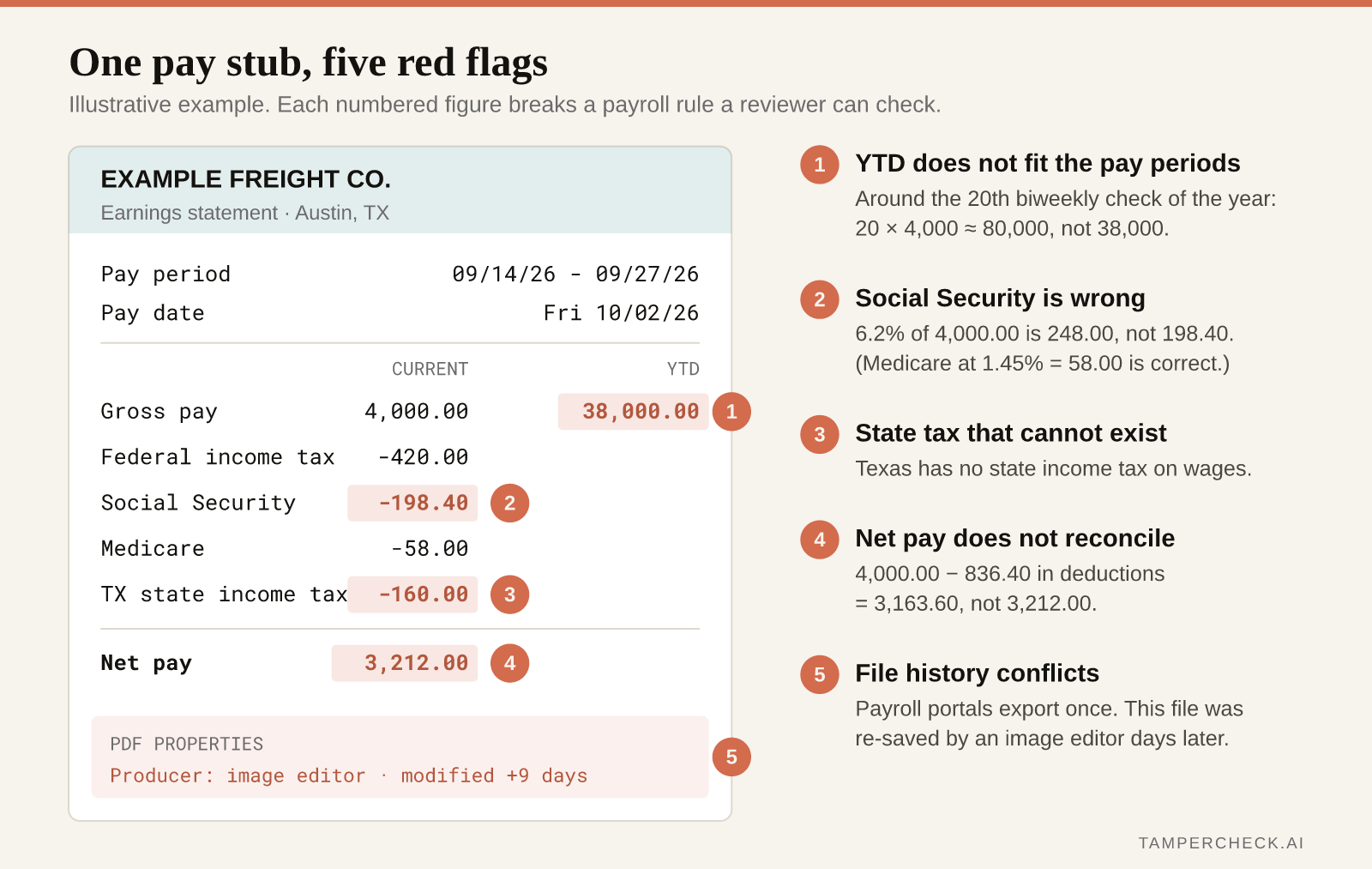
This is the single most productive check. Take the current-period gross pay, multiply it by the number of pay periods elapsed so far this year, and compare the result with the YTD gross.
A biweekly employee paid on October 3 has had about 20 pay dates this year. If current gross is $3,200, YTD gross should be in the region of $64,000. If the stub shows $38,000, either the applicant started recently (which contradicts "employed three years" on the application) or the current-period figure was inflated without touching YTD. The reverse also happens: an editor raises YTD to match a bigger salary and forgets the current period.
Raises, overtime and bonuses explain small gaps. They do not explain a gap of 30%.
2. FICA lines that do not fit gross pay
US payroll withholding has two rates that almost never vary:
- Social Security: 6.2% of gross wages, up to the annual wage base ($184,500 for 2026).
- Medicare: 1.45% of gross wages, with an extra 0.9% on wages above $200,000.
On a $3,200 gross check you expect about $198.40 of Social Security and $46.40 of Medicare. Pre-tax deductions such as a 401(k) do not reduce FICA wages, while some health and cafeteria-plan deductions do, so allow small differences. A stub where Social Security is 5%, or missing entirely for a W-2 employee, needs an explanation. So does YTD Social Security that has kept rising after YTD wages passed the wage base.
3. State tax that should not be there (or is missing)
Nine states have no state income tax on wages, including Texas, Florida, Washington, Nevada and Tennessee. A stub showing state income tax withheld for an employee who lives and works in Texas is a strong sign of a template that was not adapted. The opposite also matters: a California employee with no state tax and no SDI line is unusual.
Check local taxes too. New York City, Philadelphia and many Ohio and Pennsylvania municipalities withhold local income tax, and genuine stubs from those places show it.
4. Net pay that does not equal gross minus deductions
Add every deduction line, subtract from gross, and compare with net pay. Then do the same with the YTD columns. Edited stubs often change gross pay and forget to recompute net, or change net pay (the figure the applicant cares about) and leave the deductions alone.
5. Round numbers and too-tidy hours
Real payroll produces cents. Hourly rates such as $27.35, overtime at 1.5x, and partial hours make for untidy totals. Watch for an exact $4,000.00 gross, 80.00 hours every period with no overtime or PTO lines ever, or deductions that are all whole dollars. Any one of these can be legitimate. Several together on one stub is a pattern.
6. Pay dates and periods that break the calendar
Check that the pay date is a business day, that the pay period ends a few days before the pay date (most payroll runs in arrears), and that the frequency matches the period length. A "biweekly" stub covering the 1st to the 15th is actually semi-monthly. Periods that overlap or skip across consecutive stubs usually mean someone filled in a template by hand.
7. Employer details that do not check out
Look up the employer yourself rather than trusting the stub:
- Does the company exist at that address, and is the phone number on the stub the same one listed publicly?
- Is the EIN, if shown, in the nine-digit
XX-XXXXXXXformat? - Does the logo match the company's current branding?
- Is a small business with five staff really using an enterprise payroll provider?
Fabricated stubs for real employers often get the name right and the address or phone wrong, because the phone number routes to an accomplice.
8. A layout that does not match the payroll provider
Genuine stubs from ADP, Paychex, Gusto, Paylocity and other providers follow consistent layouts: the same field order, the same codes for deductions, the same fonts. Generator sites imitate these layouts, but rarely perfectly. If you see many stubs from one provider, keep a known-genuine reference and compare section order, deduction codes and how negative numbers are shown.
9. File history that contradicts the document (how tampered PDFs are identified)
A PDF records the software that created it and when it was created and modified. You can read this in your PDF viewer's document properties, or with a free tool such as our PDF metadata extractor.
Payroll portals generate stubs automatically, so the creator field usually names a reporting engine and creation and modification times are the same moment. Be wary of:
- a creator or producer field naming an image editor, a word processor or an online PDF editor;
- a modification date days or weeks after creation;
- a creation date earlier than the pay date printed on the stub;
- several stubs "from different months" that were all created within minutes of each other.
None of these proves fraud on its own. Applicants sometimes re-save files innocently. Each is a reason to ask for the original.
10. Photos and screenshots instead of the original PDF
An image of a pay stub has no PDF history, and editing an image is easier than editing a PDF. If an applicant sends a photo of a stub that their employer's portal would have issued as a PDF, ask for the PDF. The request alone deters a share of fraudulent applications.
The checks above catch careless fakes and most generator output. They do not catch a careful edit to one figure on a genuine stub, because the math was fixed and the file was re-saved cleanly. That is where pixel-level forensics comes in.
Real vs fake pay stubs: what changes under the surface
Two stubs can look identical at 100% zoom and still differ in ways software can measure:
| Signal | Genuine payroll export | Edited or generated stub |
|---|---|---|
| Text rendering | One font, one size, one baseline per column | A retyped figure in a near-match font or slightly off baseline |
| Compression | Uniform across the page | A pasted or rewritten area compresses differently |
| Text layer | Visible numbers match the extractable text | Visible number and text layer disagree, or the figure is an image |
| PDF structure | Single save from a reporting engine | Incremental saves, editor producer string, later modification date |
| Arithmetic | Reconciles across current and YTD | Often reconciles on the page, breaks against YTD or FICA rules |
This is why a stub can pass a careful human review and still fail an automated one. The human checks what the stub says. Forensics checks how each part of it was made.
What to do when a pay stub looks wrong
Do not accuse the applicant. Many red flags have innocent explanations, and fair-lending and fair-housing obligations still apply. Instead:
- Ask for the original file downloaded directly from the payroll portal, or two more consecutive stubs. Consecutive stubs expose broken YTD progressions.
- Cross-check with a bank statement. Net pay should arrive as a direct deposit on or near the pay date, for the same amount. See our bank statement verification checklist.
- Verify employment independently. Use a phone number you looked up yourself, an employment verification service, or, for mortgages, an IRS tax transcript.
- Record what you found and why, so the decision is consistent and defensible.
How automated document tampering detection catches what reviewers miss
Manual review handles the first six or seven checks well when volume is low. It breaks down when a team is reviewing hundreds of stubs a day, and it cannot see pixel-level edits at all.
Automated document tampering detection runs the arithmetic, payroll-logic and metadata checks above on every stub, then adds forensics that no reviewer can do by eye: error level and noise analysis around each figure, font and glyph consistency per field, text-layer versus visual-layer comparison, and PDF structure analysis. Each stub returns a verdict, the specific findings with the affected fields highlighted, and a risk score you can route on. Documents are processed with zero retention and never used for training.
Check a pay stub in seconds
Upload a pay stub - genuine or edited - and see exactly which fields TamperCheck flags. Free credits to start, no contract.
Test a pay stub →For lenders checking income at volume, see fake payslip detection for loans, or connect stubs straight from your application flow with the document verification API. For the wider picture of how detection layers fit together, see how document fraud detection works across income, identity and financial documents.
FAQ
- How can you tell if a pay stub is fake?
Check the arithmetic first: year-to-date totals should fit the number of pay periods, Social Security should be 6.2% and Medicare 1.45% of gross wages, and net pay should equal gross minus deductions. Then check payroll logic (state tax, pay dates, pay frequency), verify the employer independently, and read the PDF's creator software and modification dates. Careful single-figure edits need pixel and font forensics to catch.
- What is the difference between a real and a fake pay stub?
A real pay stub is produced by a payroll system from actual payroll records, so its figures reconcile across periods and its file is a single, unmodified export. A fake is either a genuine stub with figures changed, or a stub produced by a generator or template. Fakes often reconcile on the page but break against year-to-date totals, tax rules, the employer's real details, or the file's history.
- Do pay stub generators produce stubs that pass verification?
They are designed to pass a visual check, and many do. They are much less likely to pass a check that compares the stub with an independent source, such as bank deposits, prior stubs, the employer's verified contact details, or a tax transcript, or one that inspects the PDF's structure and history.
- Is using a fake pay stub illegal?
Submitting a fabricated or altered pay stub to obtain a loan, lease or job can amount to fraud, and for federally related mortgages it can be a federal offence. Lenders and landlords should still treat a red flag as a reason to verify, not as proof, because many anomalies have innocent explanations.
- Should I accept a screenshot or photo of a pay stub?
Ideally no. Images remove the file history that helps verify a document and are easier to edit than PDFs. Ask for the original PDF from the payroll portal, or verify income through a second source such as a bank statement or employment verification.
- How are tampered PDFs identified?
A tampered PDF is identified by comparing what the file says with how it was built. Forensic tools read the creator and producer software, creation and modification dates, and incremental saves; compare the visible text with the hidden text layer; and check fonts, compression and noise around each figure. A pay stub exported once from a payroll engine looks very different, structurally, from one re-saved after an edit.
- What is the best PDF document fraud detection tool for pay stubs?
Look for a tool that combines payroll arithmetic checks with PDF structure analysis and pixel-level forensics, and that shows you which field was flagged and why rather than only a score. TamperCheck does this for pay stubs, bank statements and other PDFs, and you can test it free on your own documents.
- Can software detect an edited pay stub?
Yes. Document forensics compares how each region of the stub was rendered and compressed, checks fonts and text layers field by field, and inspects the PDF structure. A single changed figure leaves traces in these signals even when it is invisible at normal zoom and the arithmetic has been corrected.