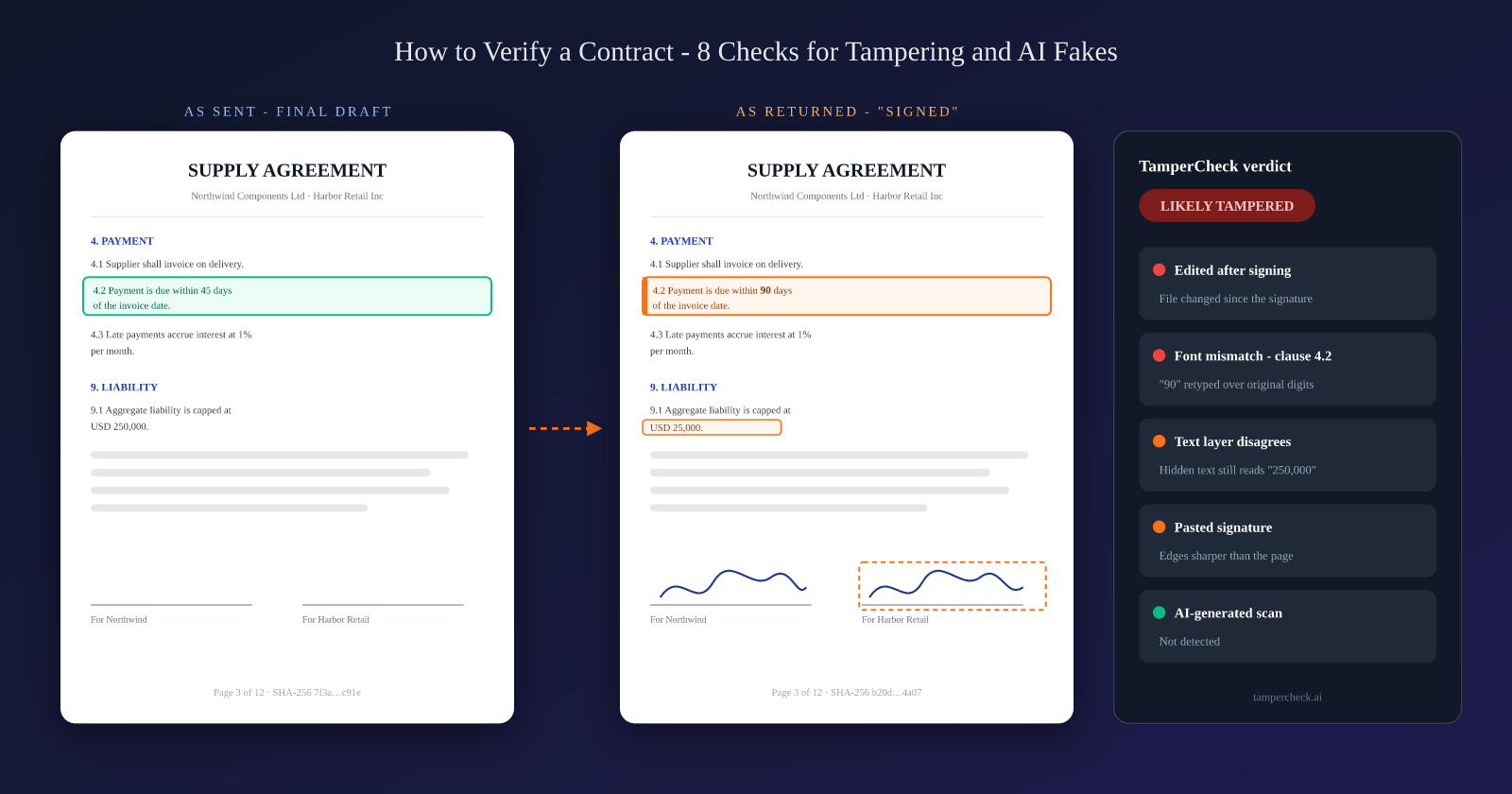
The supplier agreement comes back signed. Same filename, same layout, same signature block your team saw in the draft. It goes into the contract repository and the vendor gets set up for payment. Four months later, finance notices invoices arriving on 90-day terms. The draft said 45. Somebody pulls the signed PDF and reads clause 4.2 for the first time since signing. It says 90.
Nobody checked, because the document looked right. That is the whole problem with contracts: the only people who read them closely are the people who drafted them, and they stop reading the moment it comes back signed.
Contract verification is the process of confirming that a contract is genuine and unaltered, that it was signed by real parties with the authority to sign, and that its terms match what was actually agreed - before you rely on it to pay, lend, lease, hire, or transfer anything.
What Contract Verification Actually Checks
"Is this contract real?" is really three questions, and a document can pass one while failing another. A genuine, untouched PDF can be signed by someone with no authority to bind the company. A properly authorised signatory can sign a page that was swapped after they initialled it.
| Question | What you are checking | Typical failure |
|---|---|---|
| Is the document genuine and unaltered? | File integrity, e-signatures, metadata, forensic signals on the page | A clause, amount, or date edited after signing; a page substituted; a fully fabricated contract |
| Are the parties real and authorised? | Company registries, signatory authority, powers of attorney | A shell entity; a signatory who left the company; a revoked or out-of-scope POA |
| Are the terms what was agreed? | The signed copy against the last negotiated draft | Payment terms, liability caps, renewal dates, or governing law quietly changed |
The eight checks below cover all three. You will not need every check on every contract - but you should know which ones you skipped and why.
When You Need to Verify a Contract
Contract verification is not only a legal-team job. Contracts show up as supporting evidence across the business, often in front of reviewers who were never party to the negotiation:
- Lending and credit. Sale agreements, lease agreements, and work orders submitted as proof of income, collateral, or business activity. See our lending use case.
- Property and rentals. Leases and sale deeds - a common vehicle for rental application document fraud.
- Procurement and vendor onboarding. Master agreements, NDAs, and the compliance documents that sit beside them - the same trust gap we covered in fake vendor SOC 2 reports.
- HR and hiring. Employment contracts and offer letters submitted to prove previous salary or tenure.
- Transactions signed under a power of attorney. Property sales, bank mandates, and company filings where the person signing is not the principal.
- Due diligence. Customer and supplier contracts provided in a data room, often as scans of scans.
In most of these cases, you did not draft the contract and you have no clean copy to compare against. That changes which checks carry the weight.
How to Verify a Contract: 8 Checks
1. Compare It Against the Version You Sent
If you were party to the negotiation, this is the fastest and most decisive check - and the one most often skipped.
- Hash the files. If the counterparty was supposed to sign your exact PDF, the unsigned pages should be byte-identical. A file hash comparator tells you in seconds whether anything moved. (A digitally signed file will differ from the unsigned original by design - which is where check 2 takes over.)
- Run a text comparison between your final draft and the signed copy. Focus the eye on the fields that matter: amounts, dates, payment terms, liability caps, termination and renewal clauses, governing law, and party names.
- Count the pages. A signed contract with one page more or one page fewer than the draft is a question worth asking before anything else.
If you did not draft the contract, skip to checks 2-4 - they work without a reference copy.
2. Validate the Electronic or Digital Signature
A drawn or typed signature image on a PDF is decoration. A digital signature is a cryptographic seal over the file's bytes, and it is the single strongest integrity signal a contract can carry - when it is actually there and actually valid.
- Open the signature panel in a PDF reader rather than looking at the signature on the page. You want to see a valid certificate chain and a message that the document has not been modified since the signature was applied.
- Check for changes after signing. PDFs support incremental updates, which means content can be appended after a signature. A reader will usually warn that the document was modified after signing, and let you view the signed version - compare the two.
- Match the e-signature trail. Platforms like DocuSign and Adobe Acrobat Sign stamp an envelope or agreement ID on the pages and issue a certificate of completion. The ID on the pages, the ID on the certificate, the signer email addresses, and the timestamps should all agree.
"Signed" does not mean "unaltered". A signature image pasted onto a page proves nothing, and a real digital signature proves only that the file is unchanged since it was applied - not that the person was authorised to sign, or that the right version was signed.
TamperCheck validates embedded PDF digital signatures as part of its analysis, and an intact cryptographic seal is treated as strong evidence the file has not been edited since signing.
3. Check PDF Metadata and Edit History
Every PDF carries a story about how it was made. For a contract, that story should be boring.
- Producer and creator. A contract exported from your contract management system or e-signature platform should say so. A "signed original" produced by a consumer PDF editor, or by an image-to-PDF converter, deserves a second look.
- Created vs modified dates. A modification date weeks after the signing date, or a creation date later than the date printed on the contract, is a classic tell. The timestamp analyzer makes these easy to read.
- Incremental saves. Multiple revisions appended to a file that should have been finalised once suggest someone went back in.
You can inspect all of this for free with our PDF metadata extractor. Metadata is strong evidence when it contradicts the document - and weak evidence when it is clean, because clean metadata is easy to fake. That is why check 4 exists.
4. Run Forensic Checks on the Page Itself
When there is no digital signature and no reference copy - which is most scanned and third-party contracts - the evidence is in the pixels and the text layer. The forensic signals that matter most on contracts are:
- Edited numbers and dates. Error Level Analysis (ELA) and character-level font metrics flag a digit that was painted over or retyped, even when it looks perfect at reading distance.
- Inserted clauses. A paragraph added later rarely matches the original's kerning, baseline, and rendering engine.
- Text layer vs visible page. Editors often change what you see without changing the underlying text. A PDF whose text layer says "45 days" under a visible "90 days" has been edited.
- Pasted signatures and stamps. Edges that are too sharp, ink that does not match the page, or the same signature pixel-for-pixel on two pages.
This is automated document tampering detection - it runs every signal at once and weighs them against each other. For the full forensic breakdown, including page substitution and witness signatures, see the 8 forensic signals in disputed wills and contracts.
5. Verify the Parties and Entities
A perfectly genuine document signed by a company that does not exist is still a fake contract.
- Look up every entity in its official registry - Companies House in the UK, the MCA portal in India, the relevant Secretary of State in the US. The registered name, number, and address on the contract should match exactly.
- Check the entity is active and was active on the signing date. Dissolved and struck-off companies still appear on forged paperwork.
- Check the details you will act on. Bank details, remittance addresses, and contact emails in a contract are prime targets for alteration - confirm them through a channel you already trust, not the one printed on the document.
6. Verify the Signatory Has Authority
The person who signed needs the power to bind the party they signed for. For companies, that means checking the signatory against the registry's list of directors or officers, or asking for the board resolution or delegation of authority that covers this contract. For individuals acting on someone else's behalf, it means verifying the power of attorney - which is common enough, and abused enough, to need its own section below.
7. Verify Stamps, Notarisation, and Stamp Duty
Stamps and seals are persuasive exactly because most reviewers never check them. Where a contract relies on one:
- Notary seals and commissions can usually be checked against the issuing authority's register of notaries. Confirm the commission was valid on the notarisation date.
- Stamp duty and e-stamp certificates. In India, for example, e-stamp certificates can be checked by certificate number on the Stock Holding Corporation (SHCIL) e-stamping portal. The certificate's value, parties, and date should match the contract it is attached to.
- Apostilles issued by many countries can be confirmed through the issuing authority's e-register.
- Forensically, a stamp pasted in from another scan is one of the most common forgeries on legal documents. Its sharpness, ink density, and resolution should match the page it sits on.
8. Check Whether the Contract Was Fabricated With AI
A contract drafted with an AI assistant is not a fake. Plenty of genuine agreements start in ChatGPT. What we mean here is a fabricated contract - a "signed agreement" that never happened, generated end to end and dressed up as a scan so there is no digital trail to check.
These documents pass visual review easily, because they are internally coherent in a way human forgers rarely manage. The tells are elsewhere:
- A scan that was never scanned. No sensor noise, no paper texture, no scanner-glass dust, perfectly even lighting, and no compression history.
- Rendering glitches in the small print. Generated images still struggle with dense text - inconsistent letterforms, garbled footers, page numbers that do not follow.
- Signatures composited onto a generated page, with edges and ink that do not belong to the paper underneath.
- Layouts that match no real template. A contract "from" a bank, government body, or large company should look like that organisation's actual documents.
- Details that do not survive a lookup. Registration numbers, addresses, and stamp certificate numbers that check 5 and check 7 cannot find.
- Provenance metadata. Some image generators attach C2PA content credentials that identify the image as AI-made. Its presence is a strong signal; its absence proves nothing, because it is trivially stripped.
TamperCheck runs AI-generated document detection alongside the tampering checks. For background on the threat, see what a deepfake document actually is.
Verifying Scanned and Photocopied Contracts
Most contracts that land on a reviewer's desk are not the signed PDF. They are a scan of a wet-ink original, a phone photo, or a photocopy of a photocopy. Scanned documents change the verification playbook in three ways.
What stops working. There is no digital signature to validate, and the metadata describes the scanner or the phone - not whoever wrote the document. Checks 2 and 3 lose most of their power, which is exactly why forgers like scans.
What still works. The forensic layer survives scanning surprisingly well:
- Cross-page consistency. Every page of a genuine scan shares the same scanner, resolution, skew, compression, and paper noise. A page that was printed or scanned separately - the classic single-page substitution - breaks the pattern.
- Font and spacing on amounts and dates. A retyped figure still stands out as a statistical outlier against the rest of the document.
- Pasted signatures and stamps. Their edges, ink density, and resolution rarely match a page they were not scanned with.
- OCR vs the visible page. Where a scan has been OCR'd and then edited, the recognised text and the image can disagree.
What gets weaker. Fine signature detail - pen pressure, pen lifts, stroke tremor - blurs with every generation of copying. Forensic analysis will still catch a copy-pasted or traced signature on a photocopy, but a subtle freehand forgery on a third-generation copy needs the original and a qualified examiner.
Print-then-scan laundering. The most deliberate forgers edit the contract digitally, print it, and scan the printout, wiping the edit history in one step. It leaves its own marks: double compression, printer banding, and a scan that is suspiciously clean for its claimed age. We cover this in detail in the disputed contracts guide.
Printed copies and screen photos passed off as originals. A photo of a printout or of a screen, submitted as "the original", is a way of hiding the source file entirely. Moiré patterns, screen pixel grids, and flat print texture give it away - the document-level equivalent of the checks we describe in liveness detection vs document forensics.
How to get a scan worth verifying: ask for 300 dpi or higher, in colour, every page including blank ones and schedules, as a single PDF rather than separate images, with minimal compression. A low-resolution, black-and-white, heavily compressed scan destroys the evidence you need - and a counterparty who refuses to provide a better one is telling you something.
Power of Attorney Verification
A power of attorney lets one person sign for another, which makes it one of the most valuable documents a fraudster can forge. Property sales, bank mandates, and company filings are routinely executed on the strength of a POA the reviewer has never seen before. Verifying one means checking five things:
- Scope. Does the POA actually cover this transaction? A POA to manage bank accounts does not authorise selling property.
- Validity. Has it expired, been revoked, or ended with the principal's death or loss of capacity? A general POA typically ends when the principal loses capacity; a lasting or durable POA is designed to continue.
- Registration. Where registration is required, confirm it with the registry. In England and Wales, for example, lasting powers of attorney are registered with the Office of the Public Guardian, which lets you search its register; in India, POAs used for property transactions are typically registered with the sub-registrar.
- Identity. The attorney signing in front of you should be the attorney named in the document, verified with ID.
- The document itself. Run the same forensic checks as any contract - edited names and property descriptions, substituted pages, pasted notary seals, and AI fabrication.
AI-assisted power of attorney verification does not replace the registry check - it makes sure the document you are checking against the registry has not been altered. TamperCheck reads POAs, affidavits, and other legal documents with the same forensic pipeline it uses on contracts.
Manual Review vs OCR Tools vs Forensic Verification
Most teams already have some form of fraud document review in place. The question is what it actually catches. (CLM = contract lifecycle management software.)
| Manual | OCR / CLM | Forensic | |
|---|---|---|---|
| Reads the terms | ✓ | ✓ | ✓ |
| Compares against a known draft | Slow | ✓ (with the draft) | ✓ |
| Detects an edited digit or date | Rarely | · | ✓ |
| Detects a substituted page | Rarely | · | ✓ |
| Validates digital signatures | If someone opens the panel | Sometimes | ✓ |
| Detects pasted signatures and stamps | Obvious cases only | · | ✓ |
| Detects AI-fabricated scans | · | · | ✓ |
| Time per contract | 15-60 min | Seconds | ~1 min |
OCR and contract management platforms are built to extract terms, not to question them. An OCR engine will faithfully read a forged "90 days" and file it. We covered the gap in document tampering detection vs OCR - the short version is that extraction and verification are different jobs, and most stacks only do the first.
Contract Red Flags Checklist
If you only have five minutes, look for these:
- The signed copy has a different page count from the draft
- Amounts, dates, or party names look slightly heavier, lighter, or differently spaced than the text around them
- The PDF reader warns the document was modified after signing - or there is a signature image but no digital signature at all
- The PDF producer is a consumer editor or image converter, not your e-signature platform
- The modification date is after the signing date
- The same signature appears pixel-identical on more than one page
- A stamp or seal looks sharper or crisper than the page it sits on
- One page of a scan is noticeably different in brightness, skew, or resolution from the others
- The scan is suspiciously perfect: no noise, no skew, no texture
- The counterparty can only provide a low-resolution or black-and-white scan, and resists providing a better one
- The entity, registration number, or signatory does not match the official registry
- A power of attorney is used for something outside its stated scope
Any one of these can have an innocent explanation. Two or more on the same contract is a reason to stop and verify properly.
Verify a contract in about a minute
Upload a signed PDF or a scanned contract and get a forensic verdict covering edits, signatures, stamps, and AI fabrication. Free credits to start.
Verify a contract →FAQ
- How do I verify that a contract is legally valid?
Legal validity - whether the contract is enforceable - depends on things like offer, acceptance, consideration, capacity, and local formalities, and it is a question for a lawyer. Contract verification answers the question that comes first: is this the genuine, unaltered document, signed by parties with authority to sign? A contract that fails verification rarely needs a validity analysis.
- Can a DocuSign or e-signed PDF be edited after signing?
The file can be edited, but a proper digital signature will show it. Open the PDF's signature panel: if content was changed after signing, the reader will report that the document was modified since the signature was applied, and you can compare against the signed version. If the PDF has a signature image but no digital signature at all, it can be edited without any warning - treat it like a scan.
- How can I tell if a PDF contract has been altered?
Start with the checks that need no tools: compare it against the draft you sent, count the pages, and open the signature panel. Then look at the metadata - producer, creation and modification dates, and incremental saves. Finally, run forensic analysis, which catches edits the metadata hides: retyped digits, inserted clauses, a text layer that disagrees with the visible page, and pasted signatures.
- Can you tell if a contract was written by ChatGPT?
Not reliably, and it usually does not matter - AI-drafted contracts can be perfectly genuine. What matters is whether the contract was fabricated: a signed agreement generated as an image, with no real signing behind it. That leaves detectable traces in the page itself, like missing scanner noise, rendering glitches in small text, composited signatures, and details that do not match any registry.
- Is a scanned copy of a contract legally valid?
In many jurisdictions a scanned or photocopied contract can be admissible, but it may carry less weight than the original, and courts may require the original to be produced if authenticity is disputed. Rules vary, so check local law. For verification purposes, a scan still supports most forensic checks - but always ask for the highest-resolution copy available, and preserve the original if one exists.
- How do I verify a power of attorney?
Check its scope against the transaction, confirm it has not expired or been revoked, confirm registration with the relevant registry where required, verify the identity of the attorney, and run forensic checks on the document itself to catch edited names, property details, or pasted notary seals.
- Does contract verification replace legal review?
No. Verification tells you the document is what it claims to be; legal review tells you whether its terms are acceptable and enforceable. Run verification first so your lawyers are reviewing the real contract.
- Where can I learn more about document tampering?
For the technique-level view, read how document tampering detection works. For contracts already in dispute, see disputed wills and contracts. And our complete guide to document tampering and fraud covers every document fraud category in one place.